Powered by containerlab

Draw the network.
Antimony runs it.

Design network labs on a canvas, deploy them with one click and operate every node from your browser. Made for classrooms, built for anyone who's tired of hand-editing topology files.

$ curl -fsSL https://antimony.run/deploy.sh | bash

drag the nodes ↖

Runs on
containerlab · clabernetes
Access
OpenID Connect
Capture
Wireshark
Built with
Go · React
Desktop
Electron · Linux

01 · Design

A canvas and a YAML file, always in agreement.

Drag nodes onto the grid, draw links between interfaces and group them into areas. The schema-validated editor next to it updates as you go. Prefer typing? The canvas follows along.

  • Every containerlab kind, with icons for routers, switches, servers and clients
  • Auto-layout physics for untangling big topologies
  • Collections to organise labs by course, team or project
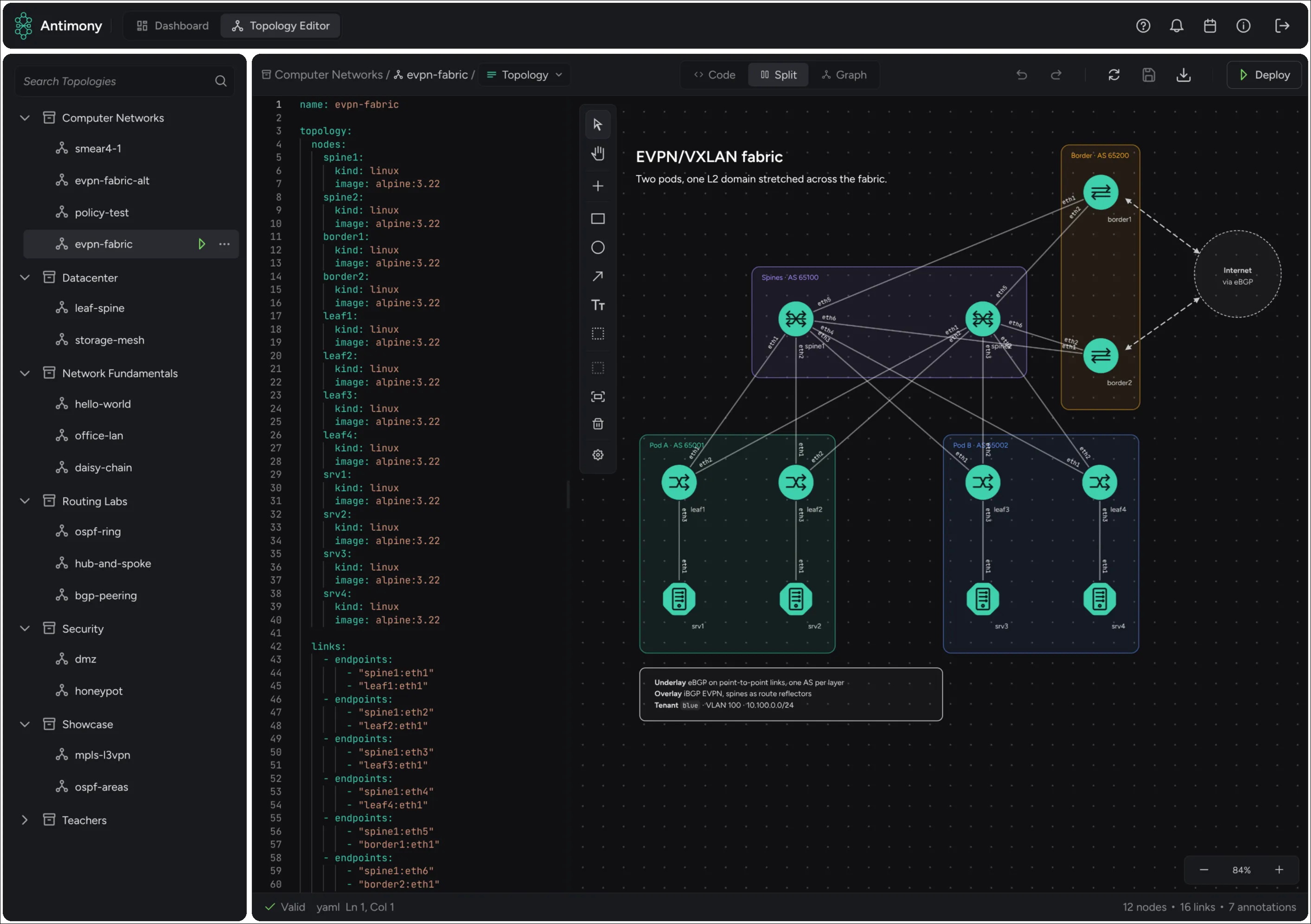
The Antimony topology editor: topologies on the left, YAML in the middle, the network graph on the right

Under the canvas

An editor that feels like a design tool.

Lay out a lab the way you'd draw it on a whiteboard. Frame nodes in groups, sketch with shapes and arrows, and write notes in Markdown. Everything snaps into line, and arrows stay connected when you move things around.

Layers of the topology editorFour stacked layers share one pan and zoom. From the bottom: the graph container with the dot grid, the underlay with groups, shapes and lines, the Cytoscape canvas with nodes and links, and the overlay with texts, the selection and its handles.Graph containerdot grid in the backgroundTopologyGraphUnderlaygroups, shapes and linesAnnotationLayer, EdgeHaloCytoscape canvasnodes and linksCytoscapeOverlaytexts, selection and handlesTextLayer, SelectionLayer, LineHandles, MoveableHandles
Hover the diagram to hold the layers apart, and a layer to see which components draw it.

02 · Deploy

One click to deploy. Or book it for Tuesday.

Run a lab right away, or put it on the calendar and Antimony starts it when the class does. Deployment status streams in live, and every node can be started, stopped or restarted on its own.

  • Scheduled deployments from a shared calendar
  • Per-node start, stop and restart
  • Runs on a single Docker host or on Kubernetes
SRL Lab 1admin / srl-lab-1
running
  • spine1nokia_srlinuxup 2h 14m
  • leaf1nokia_srlinuxup 2h 14m
  • leaf2nokia_srlinuxrestarting
  • srv1linuxup 2h 13m
This week
Mon
TueNetworks I · Lab 3
Wed
ThuRouting workshop
Fri

03 · Operate

Get into any node. Watch any wire.

Open a terminal on a node straight from the browser, with no SSH keys to hand out. Need to see the packets? Antimony's built-in SSH server streams any interface into Wireshark on your machine.

  • Browser terminals with scrollback and idle timeouts
  • Live packet capture over SSH, straight into Wireshark
  • Streaming logs and live CPU and memory per node
leaf1 · shell
--{ running }--[  ]--
A:leaf1# show interface ethernet-1/1
ethernet-1/1 is up, speed 25G, type None
  ethernet-1/1.0 is up
    Network-instance: default
    IPv4 addr    : 10.0.1.1/31 (static, preferred)
A:leaf1# 
Capture e1-1 on leaf1ssh training/dc-fabric/leaf1@antimony -p 6969 e1-1 | wireshark -k -i -
Zoey explaining a network topology on a whiteboard

Built for teaching

One server. A whole class of labs.

Antimony started as a teaching tool. Connect your university's OpenID provider, map groups to collections, and every student works in their own space while instructors see everything.

OpenID groupshs25-cn1hs25-cn2staff
CollectionsComputer Networks 1Computer Networks 2Everything (admin)

Already using containerlab's apps?

A front end, or a platform.

The Containerlab apps for VS Code, desktop and web put a graphical front end on containerlab. Antimony is a multi-user platform built on top of it, for labs that many people share.

Containerlab apps

Run containerlab on your machine or a lab host, with your topologies as files in your workspace and a Linux account as your login.

Antimony

Its own server, users and permissions: sign-in through OpenID, collections per group, scheduled labs for a whole class, and a policy that keeps labs away from the server.

Compare them

And everything around it

Live logs

containerlab and per-node container logs, streamed and highlighted.

Node stats

CPU and memory per node, on Docker or across a cluster.

Git sync

Keep a topology in sync with a file in a Git repository.

Bind files

Attach configs and startup files to a topology, right in the editor.

Archive import

Drop in an existing containerlab project and keep going.

Antimony Desktop

Antimony on your own Linux machine, without setting up a server.

Kubernetes

Deploy through clabernetes when one host is not enough.

REST + Socket.IO API

Everything the interface does is available to your scripts.

Your first lab is one command away.

$ curl -fsSL https://antimony.run/deploy.sh | bash

Then open http://localhost:8080 and sign in with the password it prints.